


Typos, Hallucinations and More: Does AI Save Time When Extracting Text? (Google Gemini vs. ChatGPT vs. Perplexity)


I’ve dabbled with Generative AI for a while, but have used it more frequently for a variety of projects since January 2025. I’ve used it to supercharge research; for help with occasional social media posts; have had it summarize time-coded transcripts and identify sound bites; and more recently, I’ve experimented with some design work.
A recent article in The Washington Post, “We tested which AI gave the best answers without making stuff up. One beat ChatGPT.” inspired me to occasionally use the same prompt on several different platforms to see how their answers differed from one another.
This series of blog posts will share insights gained from these adventures. I think “adventures” is the right term because sometimes AI can be a wild ride. At other times, it’s pretty routine.
There are certainly a number of ethical issues raised by the use of AI. I will explore those down the line as well.)
We’ll start with a straightforward task: Extracting text from a screenshot.
I wanted to share a letter I wrote to New York-Presbyterian Hospital almost 16 years ago. It was about a security guard at the hospital where my dad spent his final two and a half weeks, before passing away October 1, 2009. (Read the blog post here.)
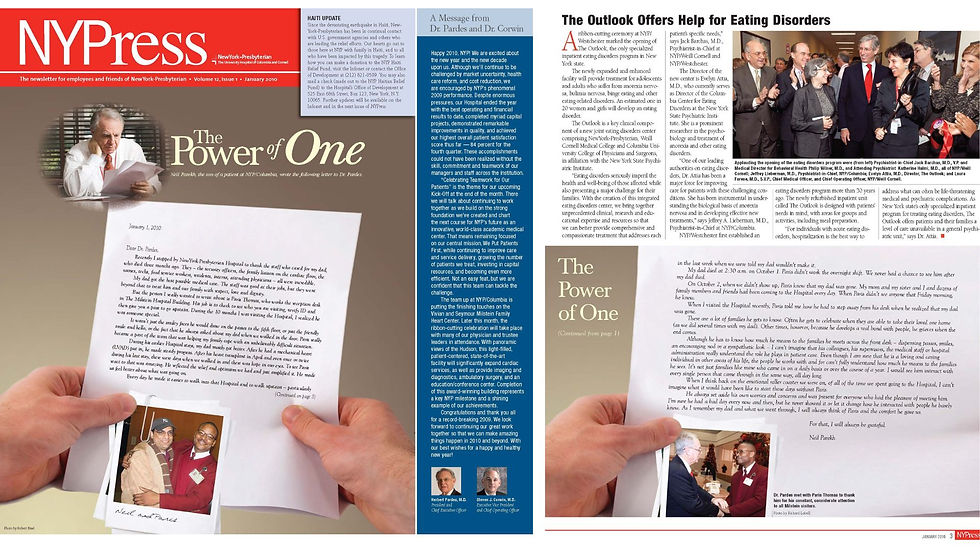
The letter had been published on the front page of the hospital newsletter in a serif font, continuing on the inside. The layout had the letter at an angle, as an inset. I wanted to publish the text on my website. Since I’ve used AI to extract text before, I thought this was a good use of the tool, a way to save time.
With AI you always have to double-check the results. In this case, some of the transcription was just wrong. A typo here and there would have been understandable, but I found examples where there were hallucinations (e.g. places where the AI just made stuff up).
Methodology
For this task, I used Perplexity Pro, Google Gemini (pro account through work) and ChatGPT Pro. I have been using Perplexity Pro since January. ChatGPT has a limit of one uploaded file every 24 hours. That’s usually not a problem, but in this case, I had uploaded a file yesterday.
I uploaded two screenshots to each platform with the prompt, “Paris Article | Please extract the text from these two images.”
I then corrected the Perplexity result manually, comparing it against the image.
Then, I shared the corrected text in each platform and entered this prompt, “Here is the actual text from the two images. Compare it to the extraction from the images. Highlight the mistakes that were made in the extraction?”
Yes. I used AI to check itself for mistakes. Comparing each transcription manually would have taken too long.
Results
Google Gemini made the fewest errors. Most of them were typos, as opposed to hallucinations. ChatGPT made the most errors, with a combination of typos and hallucinations. Most of Perplexity’s errors were egregious hallucinations. Click on the links below for the full reports or scroll down for examples.
Google Gemini - 8 Mistakes Perplexity - 10 Mistakes
ChatGPT - 14 mistakes
Closing Thoughts
You always have to Trust but Verify when it comes to AI. In some cases, the verification might take longer than doing the actual task. Maybe I would have been better off just doing the transcription myself? In this case, the text wasn’t that long, so that would have been a possibility. What if I was working with more text?
What started out as a way of saving time, led to using two other tools and writing a blog post. I’d been thinking about blog posts about my use of AI for a while, but this experience convinced me that I should do it, even though I was already swamped with work and had a lot going on both personally and professionally. Now is probably a good time to mention that I was diagnosed with ADHD last year. That’s a partial explanation for how my brain went from “Share the letter about my dad->Scan the images to get the text->Oh, AI got some things wrong->Let’s test two other platforms->Let’s write a blog post about it->Let’s call it the start of a series of blog posts about AI.”
(Today is also the start of ADHD Awareness Month. I have a whole series of posts planned for that as well.)
Yes. I used each AI platform to check its own work. It would have taken more time to check everything manually. Hopefully, they caught all of their own mistakes…
Example of a Mistake from Google Gemini
Extracted Text
“To see Paris us feel better about what was going on. reflected the relief and optimism we had and just amplified it. He made…”
Actual Text
“To see Paris react to that was amazing. He reflected the relief and optimism we had and just amplified it. He made us feel better about what was going on.”
Type of Mistake
Significant word order/line break error.
Explanation
Line break/Flow error: The extraction engine likely missed a hard return and incorrectly combined two separate thoughts/sentences, leading to a scramble of the text that spanned the bottom of the first image and the top of the next page (which wasn't shown for this specific text block).
Example of a mistake from Perplexity
Extracted Text
"During the harshest months after my dad had his nasty bout..."
Actual Text
"During his earlier Hospital stays, my dad mostly got better."
Type of Mistake
Unwarranted negative detail; loss of correct narrative detail
Explanation
Negative terms added due to model predicting illness context
Example of a Mistake from ChatGPT
Extracted Text
“I am sure that he is a loving and caring individual not only during his life at the Hospital, but long after Paris.”
Actual Text
“Even though I am sure that he is a loving caring person in other areas of his life, the people he works with and for...”
Type of Mistake
Garbled / nonsensical
Explanation
OCR rearranged words into meaningless “long after Paris.”

Gemini mistake seems bad until you see the other examples, great examples of hallucinations and exactly why dedicated OCR is usually better than tasking a general purpose model for this use case. For example, here’s what my iPhone’s native photo app OCR picked up (interestingly it ignored the “Dear Dr. Pardes” line):
“January 1, 2010
Recently I stopped by New York Presbyterian Hospual to thank the staff who caxed for my dad, who died three months ago. They - the secunty officers, the family liaison on the cardiac floor, the nurses, techs, food service workers, residents, inters, attending physicians - all were incredible.
My dad got the best possible medical case. The staff was good at their jobs, but they…